
How to grant another person access to your Google Ads Account
When you hire a pay per click firm, it is helpful to give them their own access to your Google Ads Account. This allows them to look at the account without compromising the account. It also allows you to keep tabs on their activities within your account through the History tool.
How to add an additional user to your Google Ads account:
- Login to your Google Ads account.
- Click on “My Account
- Click on “Access.”
- Click on “Invite other users.”
- On the “Invite Others to Access this Account” screen, enter the email address and name of the person you wish to grant access to.
- Choose the access level you wish to grant this person.
- Click on Continue.
- On the “Personalize your invitation” screen, you may personalize the invitation, but it is not required.
- Click on Continue.
- On the “Review and send” screen, check that the information is correct.
- If the information is correct, click on “Send Invitation.”
- Once the invitation has been sent, you must wait for the person you invited to accept the invitation. This should happen within 24 hours. If the invitation is not accepted in 24 hours, contact the person to be sure that they received it.
- Once the person has accepted the invitation, there will be an alert posted on the Account Snapshot.
- Click on “Access” in the message.
- At the top of the “Access” screen, there will be another alert.
- Click on “I Agree to the Above, Grant <> Access.”
How to grant access to an MCC Google Ads account:
The companies that manage Google Ads accounts for clients usually operate via My Client Center (MCC) accounts. To grant access to an MCC account, please follow these steps:
Step 1:
- Sign in to your Google Ads account.
- Copy/Paste your 10 digit Customer ID number located in the top right corner of your Google Ads page

Step 2:
- Send the Client ID number to your MCC manager.
- They will request access to your Client ID, which then you need to confirm – either via email or directly in Google Ads.
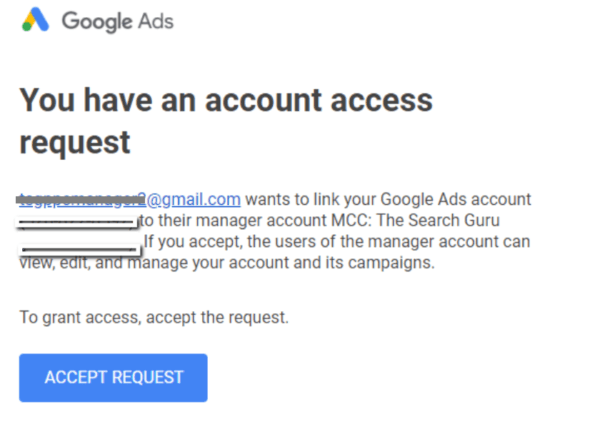
The access to your Google Ads Account has now been granted to this company. Please note, that granting access to your Google Ads account does not grant access to your Analytics account. We recommend that you also grant The Search Guru access to your Analytics account so that we can better understand your campaigns and their performance. Please read the instructions on how to grant access to your Analytics account.
We hope that you have found these directions on how to add a new user to your Google Ads account helpful. If you would like a pay per click marketing expert from The Search Guru to take a look at your Google Ads account, email us or call 440-306-2418 with your Search Marketing and SEO questions.
How can we help you meet your search engine marketing goals? Contact us today for your customized quotation.
Recent Posts

Are you struggling to keep up with the rapid pace of AI in marketing?
Tired of feeling behind the curve with AI in marketing? Discover how top B2B marketers are using AI to gain an edge and drive growth. Get actionable insights gleaned from our exclusive interviews on
What Really Keeps Marketing Heroes Up at Night?
Introduction On our podcast, "Marketing Heroes [Unfiltered]," Leslie Carruthers and Danny Muscoplat ask top B2B marketers: What keeps you up at night? The answers we’re getting are insightful and sometimes surprising. Index/ TLDR

Unlocking Global Success: Smart Implementation of Powerhouse Hreflang Tag Delivers
Caution: Missing, incorrect or unrecognized hreflang tags sabotage multilingual websites, costing you leads and sales TL;DR (Introduction) Hreflang are super handy tags that tell Google your website has a few versions of the content